Large language models are transforming every corner of software, but serving them in production is brutally expensive. A single LLaMA-13B model can consume over 26 GB of GPU memory just for its weights, and that is before accounting for the memory needed to actually process requests. When dozens or hundreds of users are hitting your model simultaneously, memory becomes the bottleneck that determines how many requests you can serve — and how much each one costs.
vLLM tackled this head-on. By rethinking how GPU memory is managed during inference, vLLM achieved 2–4x higher throughput than Hugging Face Transformers and up to 24x over the default text-generation pipeline, without changing the model weights or sacrificing output quality. The core insight? The same virtual memory and paging techniques that operating systems have used for decades can be applied to LLM serving.
In this first part, we will break down why LLM serving is so memory-hungry, what exactly gets wasted, and how PagedAttention — the algorithm at the heart of vLLM — fixes it.
This is Part 1 of a 2-part series on vLLM:
- Part 1: PagedAttention & the LLM Serving Problem (You are here)
- Part 2: Practical Serving & Walkthrough
- The LLM Inference Bottleneck
- The Waste Problem
- PagedAttention: Virtual Memory for KV Caches
- Continuous Batching vs Static Batching
- Putting It All Together
- Useful Resources
The LLM Inference Bottleneck
Unlike classification models that process an input and return a single answer, large language models generate text one token at a time. Each new token depends on every token that came before it. This autoregressive generation loop is inherently sequential and creates a unique memory challenge.
How Autoregressive Generation Works
At each step of generation, the model performs attention over all previous tokens.
- In the first step — called prefill — the model processes the entire input prompt at once and produces the first output token.
- After that, generation enters the decode phase: the model takes the most recently generated token, attends over all previous tokens, and produces the next one. This loop repeats until the model emits a stop token or hits the maximum length.
The diagram below illustrates this process. In Step 1 (prefill), the full prompt “The cat sat on” is fed into the model, which outputs “the”. In Steps 2 and 3 (decode), the output from the previous step is fed back as the new input (shown by the dashed orange arrows). The faded blue tokens represent previous tokens whose representations are retrieved from a cache rather than recomputed — only the single new input token (highlighted with an orange border) actually passes through the model at each decode step.

What is the KV Cache?
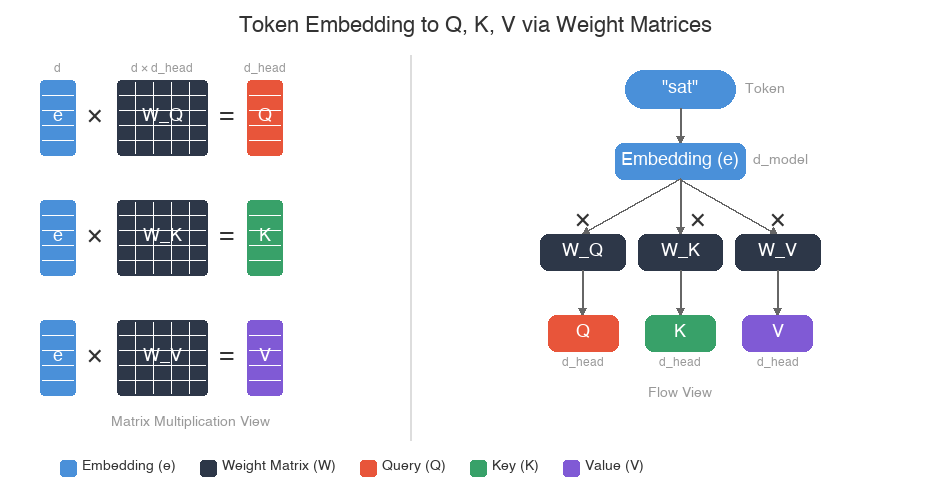
During the attention computation, each token’s embedding is multiplied by three learned weight matrices — \( W_Q \), \( W_K \), and \( W_V \) — to produce three vectors: a query (Q), a key (K), and a value (V). These weight matrices are learned during training; at inference time they are fixed, and the Q, K, V vectors are computed by a simple matrix multiplication against the token’s embedding.
The diagram below visualizes this: on the left, the same embedding vector e is multiplied by each of the three weight matrices to produce Q, K, and V; on the right, the same process is shown as a flow from token to embedding to the three output vectors. Here, d is the model’s embedding dimension (d_model), and d_head is the dimension per attention head (typically d_model / num_heads). Each weight matrix projects the full embedding into a smaller per-head space.
The next diagram shows how this works in the context of full attention. On the left, a single token (“sat”) is converted into its embedding, which is then multiplied by the three weight matrices to produce Q, K, and V. On the right, we see the full picture for Step 2 — previous tokens produce K and V vectors, the new token produces a Q vector, and attention weights determine how much each previous token contributes to the output.
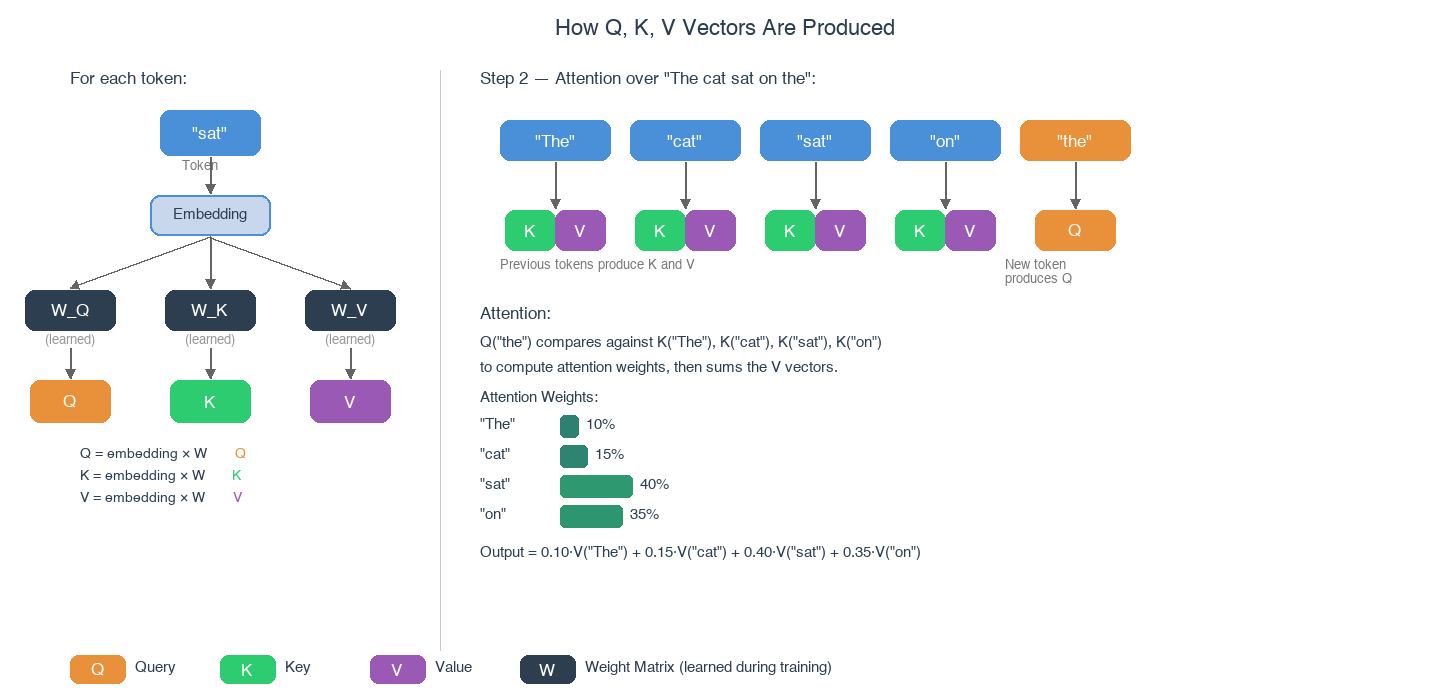
To walk through the right side of the diagram:
- The new token “the” produces a query vector — think of it as asking “what should come after me?”.
- Every previous token (“The”, “cat”, “sat”, “on”) has already produced its own key and value vectors.
- The query is compared against each key to produce attention weights — for instance, “sat” and “on” might receive high weights because they are most relevant to predicting the next word.
- These weights are used to compute a weighted sum of the value vectors, giving the model a context-aware representation that blends information from the most relevant preceding tokens.
This is how the model “attends” to context.
Naively, this would mean recomputing the key and value projections for the entire sequence at every step — an \( O(n^2) \) cost that grows quadratically with sequence length. But notice that the key and value vectors for past tokens do not change between steps — only the new token’s Q, K, and V need to be computed. So instead of recomputing everything, modern implementations cache the key and value tensors from all previous steps. This is the KV cache.
The KV cache allows each new token to attend to all previous tokens by simply looking up stored key-value pairs rather than recomputing them. This trades memory for compute — a worthwhile tradeoff, until memory runs out.
How Large is the KV Cache?
For a single request, the KV cache memory grows as:
\( \text{KV cache size} = 2 \times L \times H \times d \times s \times \text{sizeof(dtype)} \)
Where:
- \( L \) = number of layers
- \( H \) = number of attention heads
- \( d \) = dimension per head
- \( s \) = sequence length
- Factor of 2 accounts for both keys and values
For a 13B parameter model (like LLaMA-13B) with 40 layers, 40 heads, dimension 128, and a sequence length of 2048 tokens in FP16:
\( 2 \times 40 \times 40 \times 128 \times 2048 \times 2 \text{ bytes} \approx 1.6 \text{ GB} \)
That is 1.6 GB per request. If you want to serve 10 concurrent requests, you need 16 GB just for KV caches — on top of the 26 GB for model weights. With a single 80 GB A100 GPU, you can barely fit the model plus a handful of requests before running out of memory.
This is the fundamental bottleneck: the number of requests you can serve simultaneously is limited by how efficiently you manage KV cache memory.
The Waste Problem
If the KV cache is already large, you might expect that systems would manage it carefully. In practice, most serving systems before vLLM were shockingly wasteful.
How Naive Systems Allocate KV Cache
The standard approach (used by Hugging Face Transformers, FasterTransformer, and others) is to pre-allocate a contiguous block of memory for each request’s KV cache based on the maximum possible sequence length. Think of it like a restaurant that reserves the largest table in the house for every guest, even if they are dining alone.
This creates three types of waste:
1. Internal Fragmentation
When a request’s actual output is shorter than the maximum allocated length, the unused memory at the end of its allocation is wasted. If you allocate 2048 token slots but the request only generates 347 tokens, 83% of that allocation sits empty.
2. External Fragmentation
As requests of different sizes come and go, the free memory becomes scattered into small non-contiguous chunks. Even if the total free memory is sufficient for a new request, there may be no single contiguous region large enough to hold it.
3. Reservation Waste
Since the output length is unknown in advance, systems must reserve memory for the worst case. A request that might generate 50 tokens gets the same 2048-token allocation as one that generates 2000. This reservation happens up front, blocking other requests from using that memory.
The diagram below shows what this looks like in practice. Recall that the KV cache stores key-value pairs for every token the model has seen — this includes the prompt KV (cached during the prefill phase) and the generated KV (accumulated one token at a time during decoding). Together these make up the actively used portion of the allocation. In this example, the prompt contributes 256 tokens and the generated output contributes 200, for 456 tokens actively used out of a 2048-token allocation — the remaining 1592 slots sit empty, wasting roughly 78% of the allocated memory.
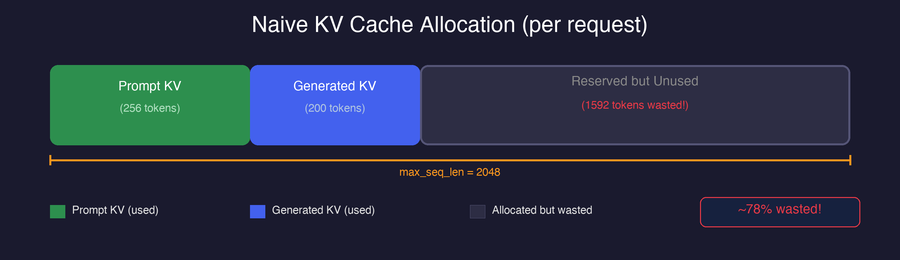
The vLLM paper measured that in typical serving scenarios, 60–80% of KV cache memory is wasted due to these three types of fragmentation. This means you are paying for 3–5x more GPU memory than you actually need, directly limiting your serving throughput and driving up costs.
PagedAttention: Virtual Memory for KV Caches
The central innovation of vLLM is PagedAttention, an attention algorithm that borrows the idea of virtual memory and paging from operating systems.
The OS Paging Analogy
In an operating system, processes do not get large contiguous blocks of physical RAM. Instead:
- Memory is divided into fixed-size pages (typically 4 KB).
- Each process has a page table that maps virtual addresses to physical page locations.
- Pages can be stored anywhere in physical memory — they do not need to be contiguous.
- Pages are allocated on demand as the process needs them, not all up front.
The diagram below illustrates this with two processes. Each process has its own set of virtual pages (VPs) — the addresses it works with — and a page table that maps them to physical pages (PPs) in actual RAM. Notice how the mappings are scattered: Process A’s VP 0 maps to PP 5, while VP 2 maps to PP 2 — there is no requirement for contiguity. The arrows represent these page table translations. Also note that both processes can share a physical page (PP 1, shown in green), which is how operating systems efficiently handle shared libraries without duplicating memory.
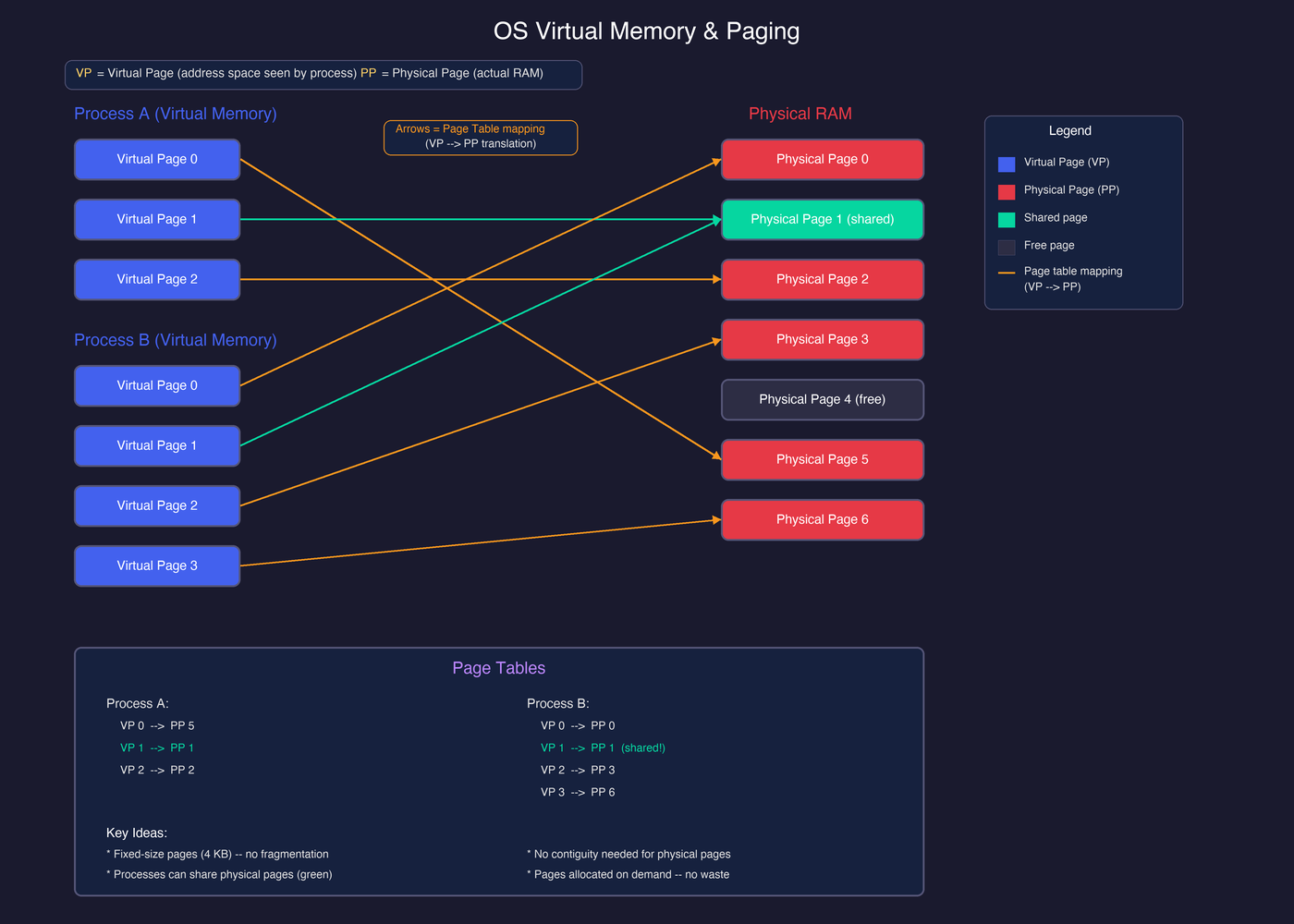
This is exactly what PagedAttention does for KV caches — instead of OS processes and RAM pages, think of LLM requests and KV cache blocks.
How PagedAttention Works
In PagedAttention, the KV cache for each request is divided into fixed-size blocks, where each block holds the key-value pairs for a fixed number of tokens (e.g., 16 tokens per block).
The key data structure is the block table — one per request — which maps logical block indices to physical block locations in GPU memory:
The diagram below shows this in action. Request A’s block table maps logical block 0 to physical block 7, logical block 1 to physical block 1, and so on. In GPU memory, Request A’s blocks are scattered across non-contiguous locations — but the block table keeps track of where everything lives.
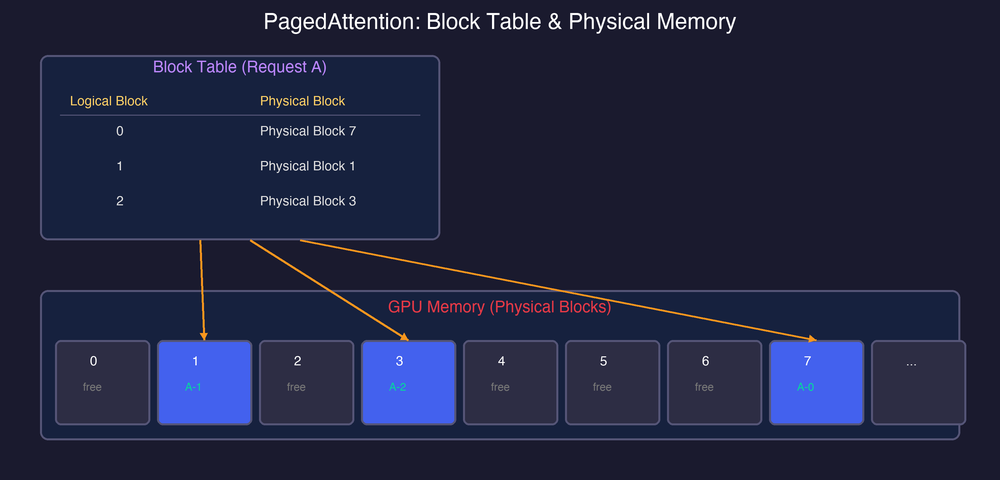
When computing attention, the algorithm looks up the block table to find where each sequence’s KV pairs physically reside, fetches them from potentially scattered locations, and computes attention as usual. The blocks do not need to be contiguous in memory.
Why This Eliminates Waste
PagedAttention addresses all three types of fragmentation:
-
No internal fragmentation (except the last block): Memory is allocated in small, fixed-size blocks. Only the very last block of a sequence can have unused slots, wasting at most \( \text{block_size} - 1 \) tokens per request — typically under 4% versus 60%+ with contiguous allocation.
-
No external fragmentation: Since blocks are a fixed size and can be placed anywhere, there is no need for large contiguous regions. Any free block can serve any request.
-
No reservation waste: Blocks are allocated on demand as the sequence grows, not pre-allocated for the maximum possible length. A request that generates 50 tokens only uses 4 blocks (at 16 tokens/block), not 128 blocks.
Compare this to the naive approach — the same request now only allocates what it actually needs, and the remaining memory stays free for other requests:
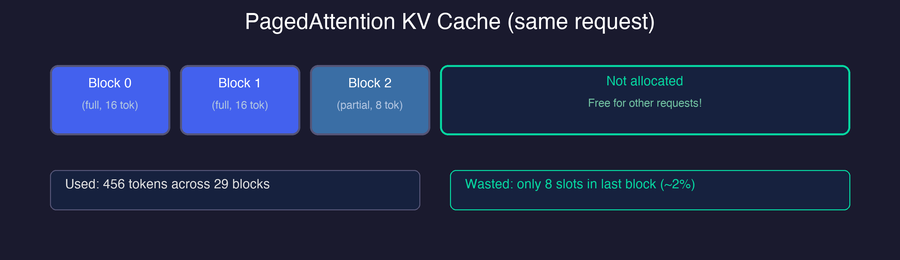
The result: vLLM achieves near-optimal memory utilization — typically over 96% — compared to 20–40% with naive approaches. This means you can fit 2–4x more concurrent requests in the same GPU memory.
KV Cache Sharing and Copy-on-Write
PagedAttention unlocks another powerful optimization: memory sharing between requests that have common prefixes. Because the KV cache is split into blocks referenced through block tables, multiple sequences can point their block table entries to the same physical blocks — storing shared KV data only once instead of duplicating it per request. This is KV cache sharing, and it shows up in two key scenarios:
- Parallel sampling — multiple outputs from the same prompt share prompt blocks.
- Copy-on-write — duplication is deferred until sequences actually diverge.
Parallel Sampling
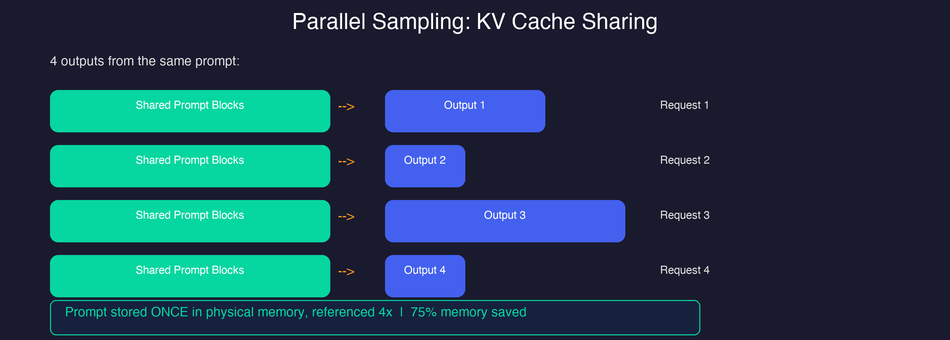
When you generate multiple outputs from the same prompt (e.g., n=4 in the API), all outputs share the same prompt. With contiguous allocation, each output gets its own full copy of the prompt’s KV cache. With PagedAttention, all outputs can share the same physical blocks for the prompt portion by pointing their block tables to the same physical blocks.
As shown below, all four requests point to the same shared prompt blocks in physical memory, while each maintains its own independent output blocks. The prompt KV cache is stored only once, saving 75% of the prompt memory.
Copy-on-Write (CoW)
What happens when generation proceeds and different outputs diverge? vLLM uses copy-on-write, the same technique used by OS fork(). When multiple sequences share a block and one of them needs to modify it (because it has generated new tokens that fill into the shared block), only then is the block copied. Until that point, the physical memory is shared.
This is particularly effective for:
- Beam search: All beams share prompt blocks and progressively diverge, with CoW minimizing duplication.
- Parallel sampling: Multiple completions from the same prompt share most of their KV cache.
- System prompts: When many requests share the same system prompt, the KV cache for that prefix can be computed once and shared.
The vLLM paper showed that for beam search with a beam width of 4, PagedAttention with CoW reduces KV cache memory usage by up to 55% compared to even an ideal contiguous allocation scheme.
Continuous Batching vs Static Batching
PagedAttention handles memory allocation, but there is another source of waste in LLM serving: how requests are batched together.
The Problem with Static Batching
In traditional (static) batching, a batch of requests is processed together, and the entire batch waits until the longest sequence finishes generating:
The diagram below shows the problem. Requests A and D finish early but sit idle (gray) until the slowest request (C) completes — wasting GPU cycles the entire time.

Each step is one decoding iteration — the model generates one token per request per step. Request A finishes after 12 iterations and Request D after just 8, but both sit idle until Request C completes at iteration 26. During this time, those GPU resources are wasted and no new requests can enter the batch.
How Continuous Batching Works
Continuous batching (also called iteration-level scheduling) removes this constraint. The scheduler checks the batch at every iteration and:
- Removes sequences that have finished generating.
- Inserts new sequences from the waiting queue into the freed slots.
With continuous batching, finished requests are immediately swapped out and new ones take their place — no GPU cycles go to waste:
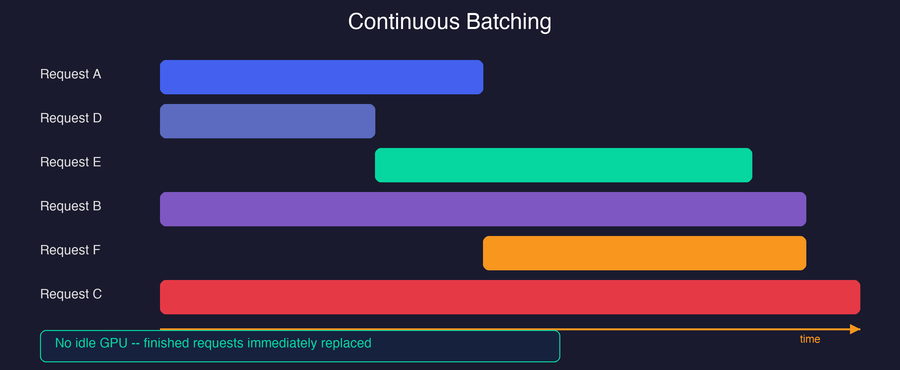
The GPU stays fully utilized because there is no waiting for the slowest request. In practice, continuous batching improves throughput by up to 2x over static batching on its own.
vLLM Combines Both
vLLM uses continuous batching together with PagedAttention. The combination is powerful:
- PagedAttention ensures that adding or removing requests from the batch is cheap (just allocate or free blocks — no memory reshuffling).
- Continuous batching ensures that the GPU is never idle waiting for slow requests.
- Together, they enable larger effective batch sizes with higher GPU utilization, multiplying the throughput gains.
Putting It All Together
Let us trace through what happens when vLLM handles a burst of requests:
- Requests arrive. Each is queued by the scheduler.
- Scheduler selects a batch of requests to process together, based on available GPU memory (tracked at block granularity).
- Prompt processing (prefill): For new requests, the model processes the entire prompt in one forward pass. KV cache blocks are allocated on demand as needed.
- Token generation (decode): The model generates one token per iteration per request. New blocks are allocated as sequences grow.
- Request completes: When a request hits its stop token or max length, its blocks are freed immediately. The scheduler can instantly slot in a waiting request.
- Memory pressure: If GPU memory is full, vLLM can preempt lower-priority requests by swapping their KV cache blocks to CPU memory, making room for higher-priority requests. When resources free up, the preempted requests are swapped back in and resume exactly where they left off.
The net effect:
- Memory utilization: 96%+ (vs 20–40% with contiguous allocation)
- GPU utilization: Near 100% (vs 50–70% with static batching)
- Throughput: 2–4x over HuggingFace Transformers, up to 24x over naive pipelines
All of this happens transparently. From the user’s perspective, you send requests and get responses — vLLM handles the scheduling, memory management, and batching under the hood.
In Part 2, we will get hands-on: installing vLLM, running batch inference, launching an OpenAI-compatible API server, and benchmarking throughput against Hugging Face.
This is Part 1 of a 2-part series on vLLM:
- Part 1: PagedAttention & the LLM Serving Problem (You are here)
- Part 2: Practical Serving & Walkthrough